Coke ON Pay
How to Use
STEP.1After setting a payment method*,
Connect to the vending machine.
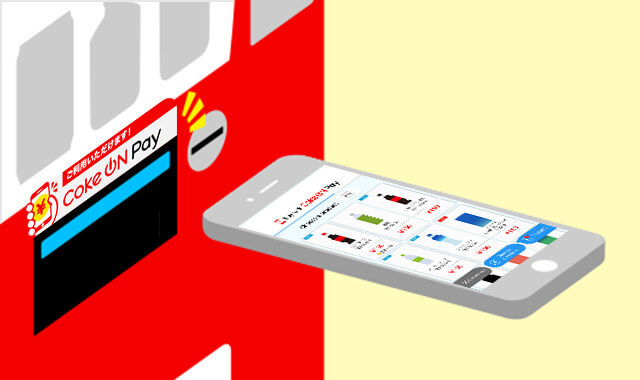
*If Apple Pay is enabled, you do not need another payment method.
STEP.2Select products via your smartphone screen or vending machine buttons!

*Points earned depend on your registered payment service.
*To select products using vending machine buttons, please turn ON the setting.
Supported vending machines
Find Coke ON Pay compatible vending machines.
You can serch vending machine which support Coke ON Pay by opening the Coke ON menu and looking for Services> Vending Machines.
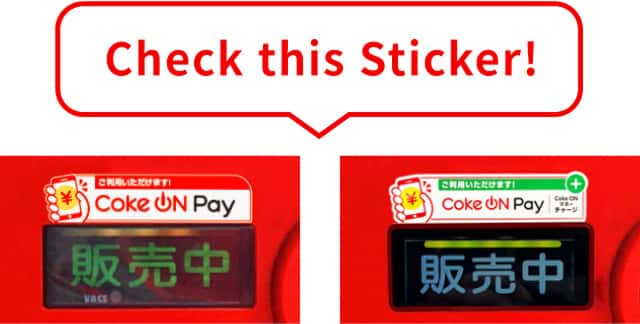
Coke ON compatible vending machines displayed with the following marks are Coke ON Pay compatible vending machines.
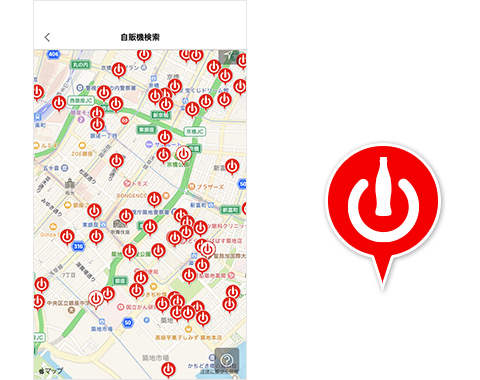
We have been expanding Coke ON Pay service nationwide.
Not all Coke ON vending machine support Coke ON Pay. Thank you for your
How to check Coke ON Pay billing history
You can view your Coke ON Pay history by tapping "Usage History" in the "Menu" (top left of the screen) of the Coke ON app.
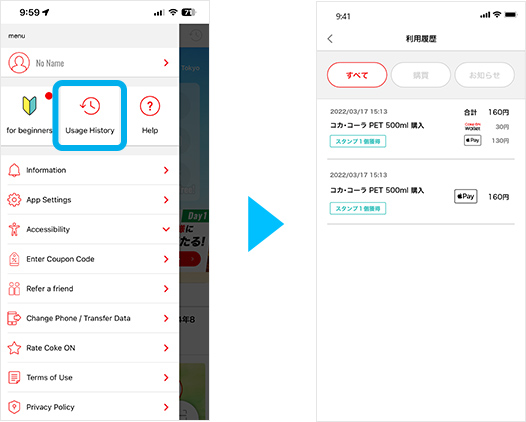
How to register and change your payment method.
Add a new payment service.
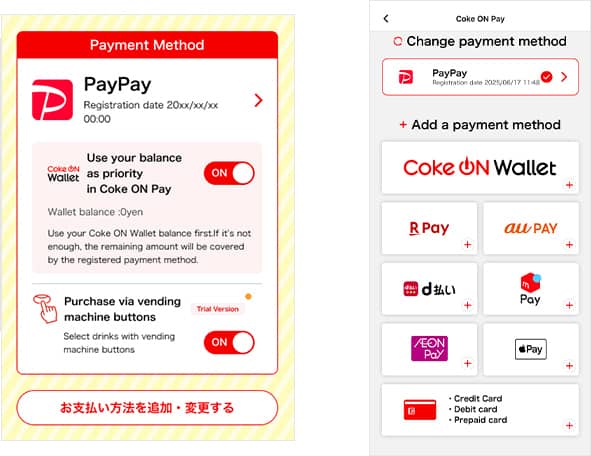
Tap "Add/Change Payment Method" button.
If you register multiple payment servicies, the default payment method will be the latest payment service that you registered.
Coke ON Wallet registration
- ・You’ll need a mobile phone number and an email address to register.
Add new credit card
- ・You can register 1 credit card maximum.
- ・To change Credit card, you have to remove registered.
Registering PayPay
- ・You have to create PayPay account befour you register PayPay to Coke ON Pay.
Registering Rakuten Pay
- ・You have to install Rakuten Pay app and set up Rakuten Pay in this device.
Registering au PAY
- ・You have to install au PAY app and set up au PAY in this device.
Registering d Payment
- ・You need to register a d account.
- ・If you don't have a d account associated with a docomo line, please register a credit card.
Registering merpay
- ・You can choose to pay by Melpay smart barai when linking, or by the balance of melpay after completing your proof of identity with the mercari app.
Registering AEON Pay
- ・You are required to install either the iAEON app or the AEON Pay app and enable the use of AEON Pay in advance.
- * iAEON is a product of AEON Smart Technology.
Registering Apple Pay
- ・You can use Apple Pay on compatible devices.
- ・Add a credit, debit, or prepaid card to your iPhone's Wallet as a payment method. (When the card information is set, the card will be automatically added as a payment method)
How to change or remove a default payment method.
From the "Coke ON Pay" screen, tap the "Add/change payment method" and choose the payment service of your choice from the "Change payment method" list.

To set as a default payment method
Please tap [Set as a default payment method], now you can use selected payment method.
To remove payment method.
Please tap "Remove from Coke ON"
PayPay
Please open PayPay app, then go to "My Account" > "External Services" and tap "Remove" button.
Apple Pay
Apple Pay is the standard payment method for iPhones and cannot be deleted.
Coke ON Wallet
Once you register with Coke ON Wallet, it cannot be deleted.
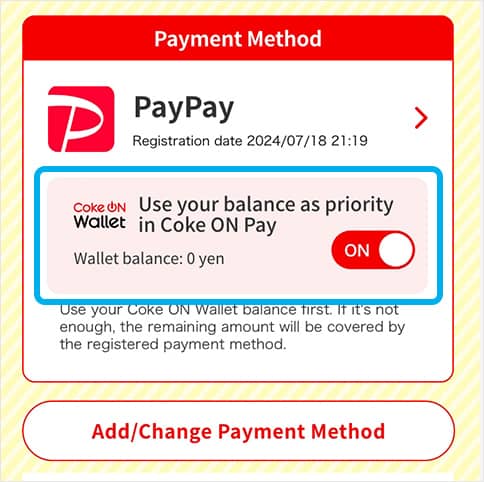
Setting up "Use your balance
as priority in Coke ON Pay"
You can use the payment service of your choice with the balance in your Coke ON Wallet.
For example, you can use PayPay and Coke ON Wallet together to make a payment.
For combined use, register your preferred payment method, and turn on "Use your balance as priority in Coke ON Pay."
FAQ
-
Product does not come out with smartphone payment
Product does not come out with smartphone payment
Coke ON Pay to make Coke ON Wallet / PayPay / Rakuten Pay / au PAY / d Payment / merpay / AEON Pay payment, the product may not come out due to communication conditions.
Even if the product amount has been settled, the automatic refund will be processed after waiting for about 5 minutes.
Check the refund processing status in each payment service's app.
Click here for details -
What is Coke ON Pay?
What is Coke ON Pay?
Coke ON Pay is a service that allows you to easily make cashless payments with a vending machine that supports Coke ON Pay by registering payment methods in advance through the Coke ON app.
-
Coke ON Pay cannot be used even when connected to a vending machine
Coke ON Pay cannot be used even when connected to a vending machine
To use Coke ON Pay, you need to use Coke ON vending machine for Coke ON Pay.
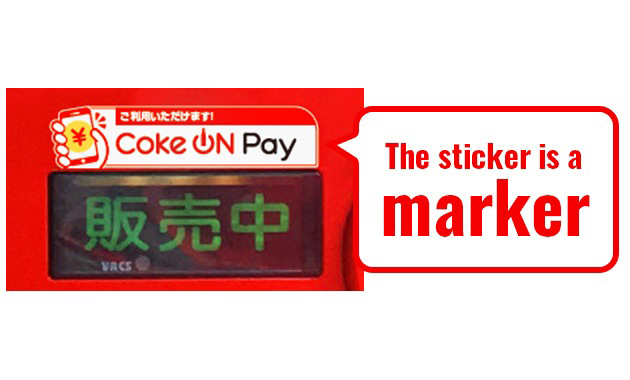
Coke ON vending machine, which corresponds to Coke ON Pay, has a sticker that says "Coke ON Pay is available".
Since October 2018, it has been gradually expanding nationwide, but please note that it is not available at all Coke ON vending machine. -
Please tell me the supported card and electronic payment service.
Please tell me the supported card and electronic payment service.
The card and electronic payment services that can be registered at Coke ON Pay are as follows.
(As of June 2025)
■ Brands that support credit cards, debit cards, and prepaid cards
Visa / Mastercard / JCB / American Express / Diners Club
■ Electronic payment service
Coke ON Wallet / PayPay / Rakuten Pay / au PAY / d Payment / merpay / AEON Pay / Apple Pay
When registering a card, you may not be able to register some of the cards of the target brand. If you cannot register, please try registering another card. -
I want to use / delete Apple Pay
I want to use / delete Apple Pay
<How to use>
The following environment is required to use Apple Pay.
· iPhone 6, iPhone 6 Plus or later iPhone, the latest version of iOS
· Latest version of Coke ON app (4.6.0 or later)
In the above environment, set iPhone to a credit card, debit card, or prepaid card.
If a card is set, it will be automatically added to the Coke ON Pay
Payment cannot be made with a transportation IC card.
■ Apple Pay compatible card brands
VISA / MASTER / JCB / AMEX
* Some Visa cards do not support Apple Pay. Contact your bank or card issuer for more information about cards and devices that support Apple Pay.
* The Coke ON app is not guaranteed to work on iPad and iPod touch. Coke ON operation confirmed terminals Here
* Apple Pay cannot be used on Android devices.
<About deletion>
Coke ON Pay refers to the information registered in the Wallet app, and is a registration-free service that does not acquire or save your payment information.
Therefore, there is no need to delete it. -
What is "Press button to buy"?
What is "Press button to buy"?
This feature allows you to purchase a product via Coke ON Pay by pressing the button on the vending machine.
This feature is currently available for trial use.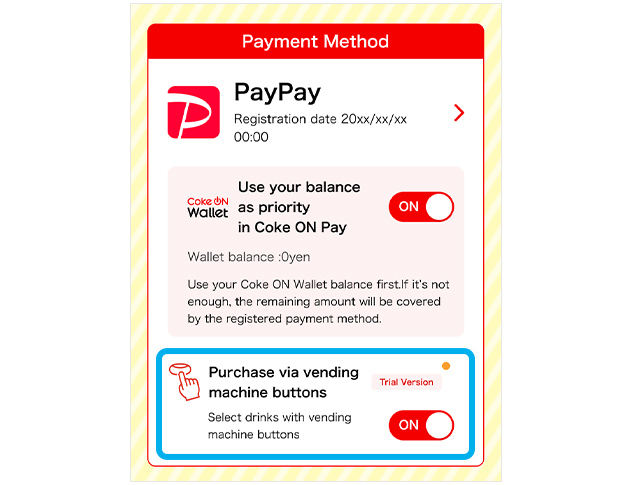
*When "Press button to buy" is turned on, DO NOT make a purchase using cash or electronic money. You may end up paying with both Coke ON Pay and cash/electronic money and purchasing two products.
-
I can't make a purchase by pressing the button even though "Press button to buy" is turned on.
I can't make a purchase by pressing the button even though "Press button to buy" is turned on.
The "Press button to buy" feature is not supported on some vending machines.
If the vending machine buttons aren't working, select a product on your smartphone and swipe to complete your purchase. -
What does "Use your balance as priority in Coke ON Pay" mean?
What does "Use your balance as priority in Coke ON Pay" mean?
This service allows you to use a payment service with your Coke ON Wallet balance. You can use your Coke ON Wallet balance in units of one yen.
For example, you can use PayPay with your Coke ON Wallet balance.
After registering a payment method with Coke ON Pay, turn on "Use your balance as priority in Coke ON Pay" to use the service.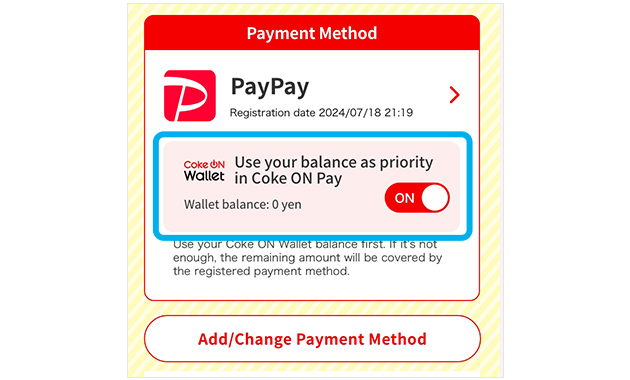
-
I have "Use your balance as priority in Coke ON Pay" turned on, but cannot make a payment using my Coke ON Wallet balance.
I have "Use your balance as priority in Coke ON Pay" turned on, but cannot make a payment using my Coke ON Wallet balance.
If your Coke ON Wallet balance cannot be retrieved due to unstable communication conditions, etc., the full amount will be paid through the payment service registered with Coke ON Pay.
Other possible causes include:
・No Coke ON Wallet balance
・Coke ON Wallet authentication required
・Connected to a vending machine that does not support Coke ON Pay
・The service is under maintenance
Please visit the Coke ON Wallet top page for your balance, authentication status, and maintenance information. -
What happens if I make a payment with "Use your balance as priority in Coke ON Pay" on with no Wallet balance?
What happens if I make a payment with "Use your balance as priority in Coke ON Pay" on with no Wallet balance?
The full amount will be paid through the payment method registered with Coke ON Pay.
-
I paid with "Use your balance as priority in Coke ON Pay" on, but I have not received any sales campaign points for using the Coke ON Wallet.
I paid with "Use your balance as priority in Coke ON Pay" on, but I have not received any sales campaign points for using the Coke ON Wallet.
Some sales campaigns do not target Coke ON Wallet "Use your balance as priority in Coke ON Pay" payments.
Please check the sales campaign terms and conditions. -
Cannot use Coke ON Pay even when connected to a vending machine
Cannot use Coke ON Pay even when connected to a vending machine
To use Coke ON Pay
・ Your vending machine supports Coke ON Pay
・ The customer has registered the payment service in advance.
Both are required.
Coke ON Pay vending machines that support the "Coke ON Pay is a mark that the sticker" is attached.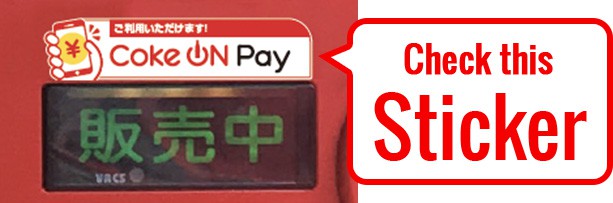
Customer,
・ If you have not registered the payment service
・ When the prescribed re-authentication has not been performed after migrating the smartphone due to a model change, etc.
・ If the payment service is registered but cannot be used due to expiration, etc.
Coke ON Pay is not available.
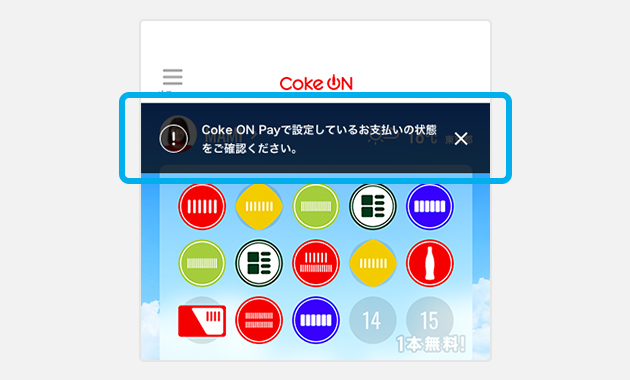
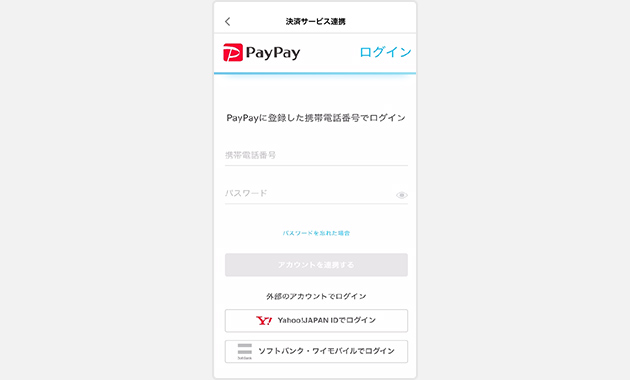
Coke ON Pay service page, and if the "!" Mark is displayed, re-authenticate or re-register according to the instructions on the screen.
Depending on the electronic payment service, there is an expiration date for the authentication of service linkage. If you need to re-link due to the expiration of the authentication, please try the following procedure.
Electronic payment service relinking method
-
Tap "Check the status of the payment method set in Coke ON Pay" on the home screen
-
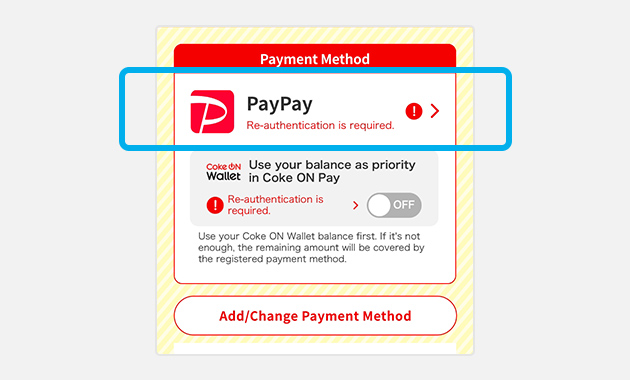
Tap the electronic payment service with the "!" Mark in "Payment Method"
-
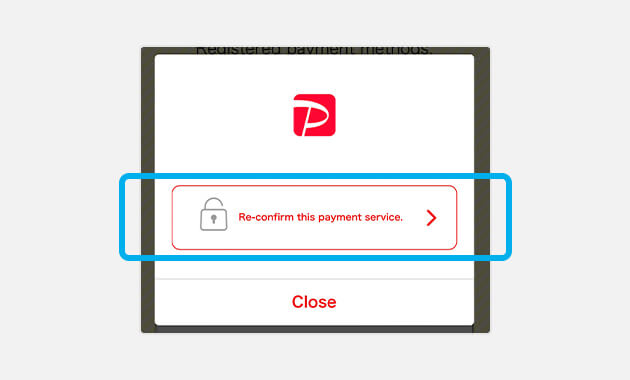
Tap "Relink"
-
Follow the instructions on the screen to relink the electronic payment service.
-
-
How can I buy a drink with Coke ON Pay?
How can I buy a drink with Coke ON Pay?
If you have registered a payment method with Coke ON Pay in advance and your vending machine supports Coke ON Pay, the Coke ON Pay button will appear when you connect the Coke ON app to the vending machine. Will be.
Select "Coke ON Pay" button and select a product from the list of available products to purchase. -
Where can I find vending machines that support Coke ON Pay?
Where can I find vending machines that support Coke ON Pay?
Coke ON Pay compatible vending machines are marked with the following stickers.
You can also find Coke ON compatible vending machines by opening the Coke ON menu and looking for Services> Vending Machines. Vending machines displayed with the following marks are Coke ON Pay compatible vending machines.
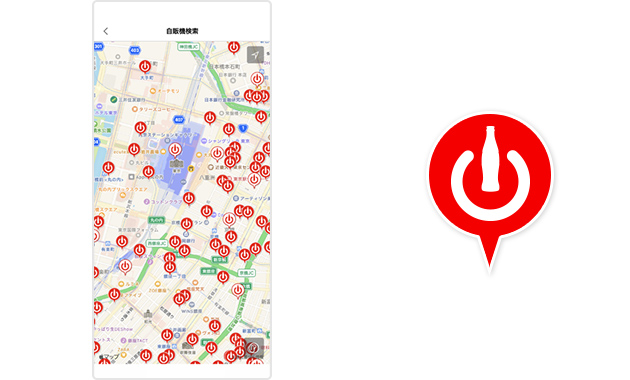
Since October 2018, it has been gradually expanding nationwide, but please note that not all Coke ON compatible vending machines can be used.
Even if you inquire about the location of the Coke ON Pay compatible vending machine, you can only provide information on the vending machine in the map below. -
Do I need to log in to use Coke ON Pay?
Do I need to log in to use Coke ON Pay?
Yes. To use Coke ON Pay, login (account authentication) to the Coke ON app is required.
By logging in, you can continue to use information such as registration card information and usage history with simple authentication even when changing models. -
I accidentally bought a product. Can I get a refund?
I accidentally bought a product. Can I get a refund?
Coke ON Pay usage cannot be canceled or refunded.